
Plumbing Business Software for Calls, Quotes, Scheduling, and Reviews
Why Plumbing Companies Need More Than a Basic Contact List
Plumbing leads move fast. A homeowner with a leak, clogged drain, broken water heater, or sewer issue is usually not waiting days for a reply. If the first call is missed, the estimate is not followed up, or the technician forgets to request a review, revenue leaks out of the business in small but expensive ways.
A CRM for plumbing companies should do more than store names and phone numbers. It should help the office and field team see where every opportunity stands, automate the next touchpoint, and keep urgent jobs from slipping through the cracks.
The Service Pilot is built for service businesses that need CRM, automation, scheduling, follow-up, reviews, and AI-powered lead conversion in one place.
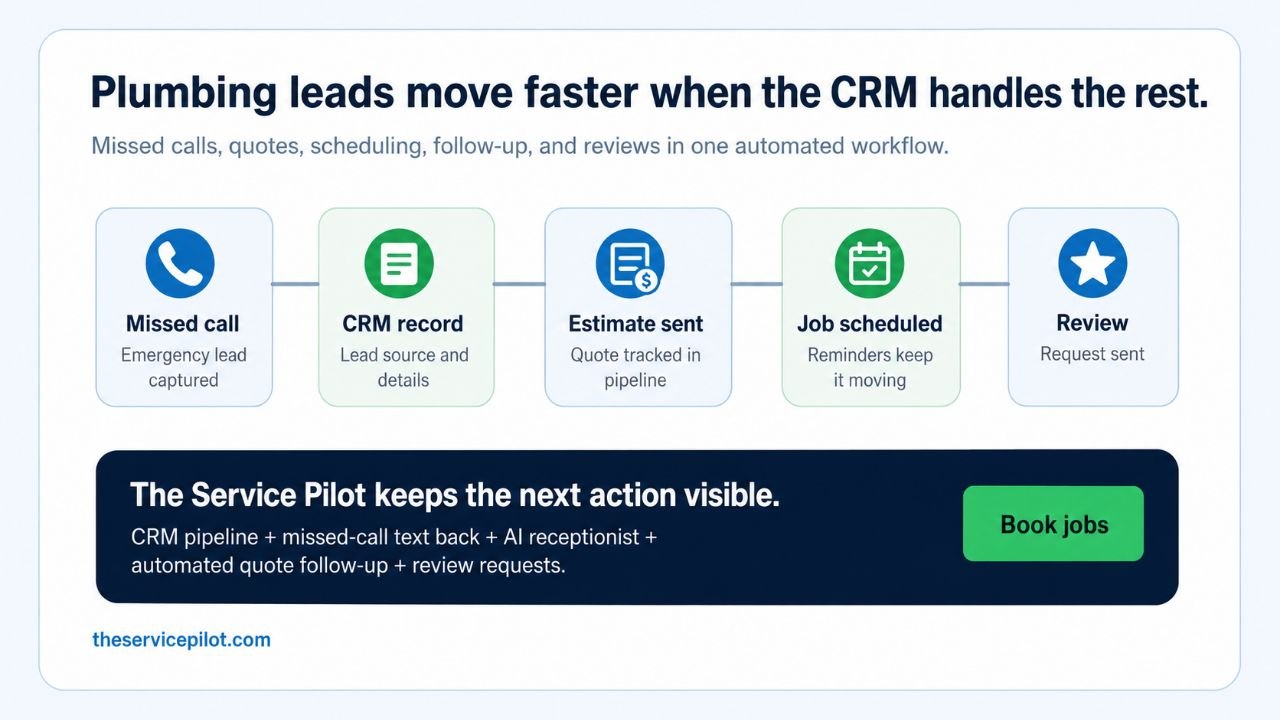
The Plumbing CRM Problems That Cost Real Revenue
Most plumbing companies do not lose leads because they are bad at the trade. They lose leads because the workflow around the trade is messy.
Related resources: Service Pilot features, Service Pilot pricing, Service Pilot FAQ, AI receptionist, missed-call text back vs AI receptionist, field service CRM for small businesses, CRM for HVAC companies.
Common failure points include:
- Missed emergency calls during jobs, after hours, or while the office is busy
- Quotes that are sent once and never followed up
- New customer details scattered across phones, notebooks, texts, and spreadsheets
- No clear pipeline for new lead, estimate sent, job scheduled, invoice sent, and review requested
- Technicians forgetting to trigger post-job communication
- Customers asking for updates because scheduling and reminders are inconsistent
- Good jobs ending without a Google review request
The right CRM closes those gaps by making each stage visible and automating the routine follow-up that busy teams rarely have time to do manually.
What a Plumbing CRM Should Include
For a plumbing business, a useful CRM should support the full customer journey from first contact to repeat service.
Key features to look for:
- Lead capture from calls, forms, messages, and ads
- Pipeline stages for new leads, quoted jobs, scheduled jobs, completed jobs, and follow-up
- Missed-call text back so a lead gets an immediate response
- AI receptionist support for call capture, qualification, and routing
- Estimate and quote follow-up sequences
- Appointment reminders by SMS and email
- Review request automation after completed jobs
- Customer history so repeat callers are easier to serve
- Reporting on lead sources, booked jobs, and follow-up activity
- Mobile access for owners, office staff, and field teams
The goal is not to add more admin work. The goal is to make the next best action obvious and, where possible, automatic.
How The Service Pilot Helps Plumbing Companies Respond Faster
The Service Pilot brings CRM and automation together so plumbing companies can build a cleaner sales and service workflow.
Useful plumbing workflows to evaluate include:
- Connected CRM records for leads, customers, jobs, notes, and next steps
- Calendar and job tracking that keeps customer, service, estimate, invoice, note, and field-photo details available from scheduled work
- Estimate and quote workflows with packages, add-ons, and follow-up
- Email, SMS, reminders, updates, and follow-up tied to customer history
- Invoices, deposits, recurring charges, and payment status in context
Before choosing plumbing CRM software, ask whether office and field teams can see the same customer and job record, move an estimate into scheduled work, keep communication history attached, and review invoice or payment status without rebuilding the workflow in separate tools.
Example Plumbing CRM Pipeline
A simple plumbing pipeline can start with these stages:
- New lead
- Needs qualification
- Estimate requested
- Estimate sent
- Follow-up needed
- Job scheduled
- Job completed
- Invoice sent
- Review requested
- Repeat service opportunity
Each stage should have a clear owner and next action. If a quote sits too long, the system should remind the customer. If a job is completed, the system should request a review. If a customer asks about another service, the team should see the relationship history instead of starting from scratch.
Plumbing CRM Automation Workflows to Evaluate
Before enabling automation, confirm that the timing, message content, and handoff rules fit your plumbing company’s process and customer communication requirements.
Ask the vendor to demonstrate how the system handles:
- Lead and customer records with job notes and next steps
- Estimate and quote workflows with packages, add-ons, and follow-up
- Scheduling and job tracking with service, estimate, invoice, note, and field-photo details
- Email, SMS, reminders, updates, and follow-up tied to customer history
- Invoices, deposits, recurring charges, and payment status in context
A useful evaluation should show where each workflow starts, what the team can review or change, and how communication history stays attached to the customer record.
FAQ
What is the best CRM for plumbing companies?
The best CRM for a plumbing company is one that tracks leads, estimates, jobs, follow-up, reviews, and customer communication in one workflow. A generic contact database is usually not enough for a service business that depends on fast response times and repeatable follow-up.
Can a CRM help with missed plumbing calls?
A CRM can keep the caller, communication history, job notes, and next step attached to one record. Ask the vendor to demonstrate when a missed-call response starts, what the office can review or change, and how a conversation is handed to a person. If AI receptionist or text-back tools are part of the setup, confirm their availability, configuration, and routing for your plumbing company.
Should plumbing companies automate quote follow-up?
Quote follow-up can be automated when the timing, message, opt-out handling, and staff handoff fit the company’s process. Ask the vendor to show how a sent estimate enters follow-up, how the team pauses or changes a message, and where replies and next steps appear in the customer record.
Does The Service Pilot replace plumbing field service software?
The Service Pilot is focused on CRM, automation, lead conversion, communication, reputation, and marketing workflows for service businesses. Depending on the company’s stack, it can work as the main customer growth system or alongside specialized field service tools.
CTA
If your plumbing company is missing calls, forgetting quote follow-up, or relying on manual reminders to keep jobs moving, The Service Pilot can help you build a cleaner CRM and automation system for your service workflow.
Start with missed-call text back, quote follow-up, scheduling reminders, and review automation. Then build the pipeline your team can actually use every day.
Connect plumbing CRM to missed-call and quote follow-up
Plumbing companies often lose good leads between the first emergency call, the estimate, the booking, and the review request. A plumbing CRM should make those handoffs visible instead of leaving them in text threads, voicemail, or memory.
The Service Pilot can connect missed-call text-back software for service businesses, AI receptionist workflows, and quote follow-up software so plumbing leads move into a tracked customer pipeline.
For owners comparing broader systems, the service business CRM guide, contractor CRM page, and review automation for contractors explain how follow-up, scheduling, payments, and reputation workflows fit together.
Plumbing CRM lead recovery FAQ
Why do plumbing companies need CRM follow-up?
Plumbing leads often come from urgent leaks, drain clogs, water-heater issues, and homeowners comparing several companies at once. A dedicated CRM for plumbing companies should keep the lead source, job notes, quote status, next follow-up, booked appointment, invoice, and review request visible in one workflow.
How should a plumbing CRM handle missed calls?
Plumbers are often driving, on-site, or inside a service call when the next customer reaches out. The Service Pilot can connect missed-call text-back software for service businesses and AI receptionist workflows to the same CRM pipeline so the customer gets a fast response and the owner can still see the next step.
What automations matter after a plumbing estimate?
The strongest setup connects quote follow-up software, service business CRM, contractor CRM workflows, and review automation for contractors so plumbing companies can move from first call to booked work to reputation growth without relying on memory.
Plumbing CRM should connect emergency calls, estimates, and follow-up
Plumbing companies often lose the job when the first call, estimate, reminder, invoice, and review request live in separate places. A practical plumbing CRM should keep emergency lead intake, customer notes, quote status, scheduled work, payment reminders, and follow-up history attached to the same customer record.
Which plumbing CRM workflows matter most?
The first workflows to connect are missed-call capture, appointment scheduling, estimate follow-up, invoice reminders, job notes, and post-job review requests. The Service Pilot ties this page into AI receptionist for plumbing companies, missed-call text-back software, quote follow-up software, and review automation for contractors.
How does plumbing CRM fit the larger contractor CRM system?
Plumbing teams still need the same operating layer as other trades: lead source tracking, pipeline visibility, customer communication, scheduling, invoicing, and repeat-work prompts. That makes a plumbing CRM page stronger when it connects back to contractor CRM software, home service CRM, and service business CRM.